
Compress PDF
Shrink PDF files online without registration
 Google Drive
Converting in only three steps
Sometimes PDF documents are too large to send by e-mail. With File-Converter-Online.com PDF documents can be noticeably reduced in size with little to no loss of quality, so that even large documents can be sent by e-mail.
How can I reduce the size of PDF files?
- Upload your PDF file
- Select the desired resolution (see below).
- Click “Start conversion”.
- The download of your compressed PDF document starts on the next page – done!
When compressing PDF documents, you can select the DPI number yourself. DPI stands for dots per inch and controls the resolution and thus quality of your PDF document.
For text documents and scanned documents, 150 DPI is usually sufficient so that you can usually reduce the size of your PDF documents considerably. At 150 dpi, the file is 55% smaller on average (annual statistics 2025).
Compress PDF without loss of quality:
If you want to reduce the size of your PDF files without losing quality, you should select a DPI value of around 300 DPI. This ensures that the document remains legible even with normal (e.g. A4) printouts. If this is not sufficient to reduce the size of the document, you still have the option of splitting the PDF document to send it in several parts or individual PAGES. Unfortunately, a certain size per page is necessary to achieve high quality – a very small file with very high quality is therefore not always possible.
Compress PDF: Comparison of the resolution in DPI
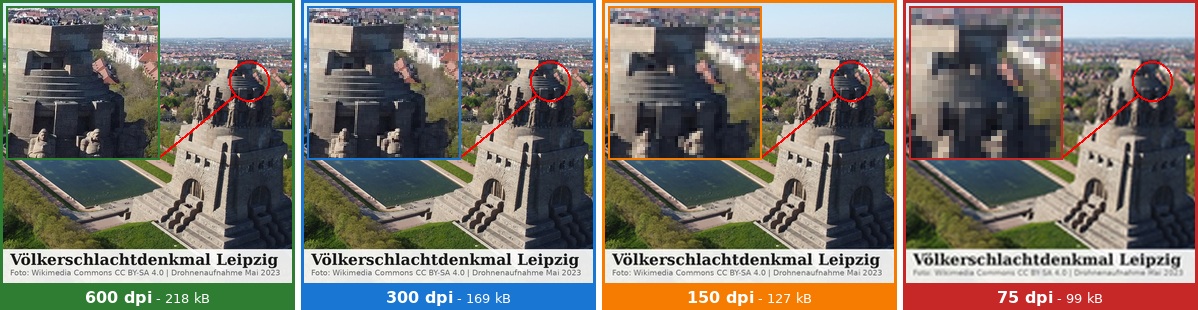
Comparison of different DPI levels
The image clearly shows the effect of the different quality levels (DPI) of a PDF file. The small section at the top left shows an enlargement of the section to simulate a very close view of the printed file (or enlargement on the screen). The following comparison helps to better assess the different DPI levels and file sizes.
At 600 DPI, the original resolution of our PDF document, all details are clearly recognisable. The text below the image is also very easy to read. It is noticeable that the individual statues on the monument head are still recognisable.
At 300 DPI, the text is still clearly legible. However, the houses in the distant background of the monument blur into indistinct blocks when enlarged. Everything is clearly recognisable in the overview.
At 150 DPI, the text is still clearly legible, but the smaller text already shows so-called artefacts, “fraying” at the letters. The detail enlargement of the image is also somewhat blurred in the foreground.
Finally, at 75 dpi, the image is already blurred even without magnification. The text is still legible, but already somewhat frayed.
Size limits for various email providers and application portals:
20 MB (Microsoft Outlook Desktop) or 25 MB (GMail and Outlook Web) per attachment. These limits must be adhered to in order to send PDFs by email. Most application portals expect your complete application documents (if necessary, merge PDF beforehand) to be contained in a PDF of less than 5 MB. Remember that a file that is too large or too big can also have a negative effect (long opening time, long time to forward, etc.).The following table shows how many pages at different DPI numbers result in which file size:
Scanned documents (A4, colour)
| DPI | approx. MB per page | at 5 MB | at 20 MB | at 25 MB |
|---|---|---|---|---|
| 75 DPI | 0.1-0.2 MB | approx. 25-30 | approx. 100-150 | approx. 125-200 |
| 150 DPI(our standard) | 0.3-0.5 | approx. 10-15 | approx. 40-60 | approx. 50-80 |
| 300 DPI | 1.0-2.0 | approx. 2-4 | approx. 10-20 | approx. 12-25 |
| 600 DPI | 3.0-5.0 | approx. 1-2 | approx. 4-6 | approx. 5-8 |
PDFs digitally created – not scanned
| Content / ideal DPI | approx. MB per page | at 5 MB | at 20 MB | at 25 MB |
|---|---|---|---|---|
| Pure text (75 – 150 dpi) | 0.01-0.02 MB | approx. 500 | 1,000+ | 1,000+ |
| Text + a few images (150 DPI) | 0.1-0.3 MB | approx. 40-100 | approx. 70-200 | approx. 80-250 |
| Image-heavy (brochure – 300 DPI) | 0.5-2.0 MB | approx. 8-20 | approx. 12-40 | approx. 15-50 |
Note: the actual sizes and page numbers may vary greatly depending on the exact content type.
Optimised PDF files – How to easily reduce the file size
The PDF (Portable Document Format) format is a popular file standard for pre-formatted documents that do not allow users to make any changes. You can use this versatile format when sending applications, invoices, CVs or book excerpts, for example. And since the PDF file is basically any print page, you are not tied to text or formatting. The file can be opened on mobile devices, Macs, Windows and Linux computers and is always displayed in the same way.
All these advantages make PDF documents such an indispensable part of digital life, but PDFs sometimes also have a decisive disadvantage: their size.
So whether you want to send a document by email, share it online or archive it – PDFs that are too large are often unsuitable as email attachments or in online application forms and are simply bulky to handle. Extreme file sizes can even have a negative impact on computer performance.
Simple solution without installation with online conversion
File-Converter-Online.com offers easily adjustable options to reduce a PDF file to a smaller file size.
All you have to do is upload the file and select the final print quality in DPI. Your document will then be converted online and you can download the target file.
This works easily, quickly and effortlessly from any device – even if you are on the move on your smartphone or tablet.
Even when sending by email, DPI (dots per inch) is a simple target size for reducing the size of your PDF – just 150 DPI offers you an ideal compromise between file size and quality.
File-Converter-Online.com also offers you the option of converting PDFs into third-party formats such as jpgs, DOC or EPUB, thus enabling a differentiated export.
Optimal dispatch thanks to optimised PDFs
When sending all files, you should always consider the recipient. Nobody likes to receive several hundred megabytes of data, especially not in their email inbox. And because PDFs are such an important file format for official correspondence, it is all the more important to find the right balance between size and quality.
With an optimised PDF, you make a good impression even before opening it and also save storage space, bandwidth and time when sending.
 Last updated on April 5, 2026 by Sören Ramspeck with the experience of more than 129,621,020 converted files since 2013.
Currently we support the following conversions with PDF files:
- Convert PDF to ODS
- Convert PDF to HTML
- Convert PDF to DOC
- Convert PDF to EPUB
- Convert PDF to XLSX
- Convert PDF to DOCX
- Convert PDF OCR
- Convert PDF to XLS
- Convert PDF to TIFF
- Convert PDF editor
- Convert PDF to JPG
- Convert PDF to ODT
- Compress PDF
- Convert NEF to PDF
- Convert JFIF to PDF
- Convert ORF to PDF
- Convert PPSX to PDF
- Convert Create PDF
- Convert EPUB to PDF
- Convert CR2 to PDF
Compress PDF - Frequently asked Questions
- 75 dpi: Maximum compression, lowest quality. Sufficient for normal letters, may be difficult to read for footnote texts
- 150 dpi: Good balance, recommended for most text documents with good size savings.
- 300 dpi: generally suitable for everything, including detailed graphics, low compression
- 600 dpi: generally only required for photo print quality, minimal compression
5. November 2022
You are doing really best work for all online employee.
8. November 2021
The software is highly assisting me in file conversation to PDF to DOC